Tech
Streamlining Directus Workflows with directus-sync: A Comprehensive Guide
directus-sync streamlines configuration synchronization across multiple Directus environments, ensuring consistent and reliable data handling. This article outlines its key features, command-line usage, customization hooks, and practical examples for seamless integration into diverse workflows.

Édouard Demotes-Mainard, AI/ML Innovation Engineer9 min read

In this article
In the realm of content management systems (CMS), Directus stands out for its flexibility, extensibility, and ability to manage content seamlessly via its API. However, developers often encounter challenges when trying to synchronize configuration data across various environments, such as staging, production, and development setups. Recognizing this pain point, the development of directus-sync introduces a robust solution that streamlines the synchronization process, ensuring consistency across all environments. This article dives into the capabilities of directus-sync, showcasing its benefits through practical command line and code examples.
Introduction to directus-sync
directus-sync is a command-line interface (CLI) tool designed to manage and synchronize schema and configurations within Directus across different environments.
directus-sync exports of all configurations made through the Directus interface into JSON files, facilitating their versioning, and subsequently allows for the restoration of these configurations to another Directus instance.
By leveraging Directus's REST API, it ensures high fidelity of operation closely aligned with the native actions performed within the application. directus-sync focuses on granular updates, differential data changes, and organizes backups into multiple files for improved readability and version control.
Key Features
- Granular Updates: Applies only necessary changes, preserving data integrity and history.
- Improved Readability: Organizes backups into multiple files, enhancing trackability and version control.
- Comprehensive Synchronization: Covers crucial configuration data like permissions, flows, dashboards, and custom datasets.
What is synchronized ?
- Directus Schema (This encompasses the structure and configuration of all the collections and fields within Directus, enabling the tracking of data models and user interface configurations.)
- The following entities from Directus :
dashboards,flows,folders,operations,panels,permissions,presets,roles,settings,translations, andwebhooks.
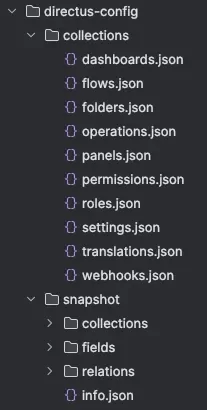
Each element from the Directus collections, including the Directus schema itself, is stored in a separate JSON file. These files are organized within a structured directory layout, reflecting the type of element (e.g., dashboards, flows, folders, etc.) they represent.
Getting Started
Requirements
To synchronize items across Directus instances effectively, each instance, whether a source or a destination, must have the directus-extension-sync installed. Install it by running the following command in your Directus installation root:
npm install directus-extension-syncAfter installation, restart Directus to ensure the extension is activated. This extension is vital for maintaining consistent relationships and configurations across instances despite variations in unique IDs.
Configuration
First, obtain the email and password of your Directus installation’s admin user.
Next, create a configuration file named directus-sync.config.js at the root of your Directus project:
module.exports = {
  directusUrl: 'http://localhost:3000', // Change this to your Directus URL
  directusEmail: '[email protected]',
  directusPassword: 'my-directus-password',
  dumpPath: './directus-config',
};
Alternatively, you can use an directusToken instead of the email and password. To generate a token for your admin user, follow these instructions.
Note: The tool offers numerous configuration options, which can also be specified through environment variables or CLI arguments. For more details, consult the readme file.
Pull the Configuration from Directus
To fetch the current schema and collections from Directus, execute:
npx directus-sync pullThis command generates a folder with the following structure, which you can commit to your git repository to back up your Directus configurations:
Restore the Configuration to Directus
To apply changes from your local environment to a Directus instance and update it to your local state, run:
npx directus-sync pushTo push configurations to another Directus instance, override the URL and authentication by passing arguments to the CLI:
npx directus-sync --directus-url https://example.com --directus-email [email protected] --directus-password xxxxxxxx pushOr use a token:
npx directus-sync --directus-url https://example.com --directus-token xxxxxxxx pushCheck Differences Between a Directus Instance Configurations and Local Files
To analyze differences between your local schema and collections and the state of a Directus instance, use:
npx directus-sync diffThis command provides a non-destructive comparison, highlighting discrepancies without making any changes.
Advanced Usage
Hooks for Custom Logic
directus-sync supports hooks, allowing developers to insert custom logic during the synchronization process. For example, to modify the names of flows before dumping:
// directus-sync.config.js
module.exports = {
  hooks: {
    flows: {
      onDump: (flows) => flows.map(flow => ({ ...flow, name: `🧊 ${flow.name}` }))
    }
  }
};
Filtering Elements
Using the onQuery hook, you can filter out elements during the pull command, such as excluding flows and operations starting with Test::
// directus-sync.config.js
module.exports = {
  hooks: {
    flows: {
      onQuery: (query) => ({ ...query, filter: { name: { _nstarts_with: 'Test:' } } })
    }
  }
};
Lifecycle and Workflow
More information about the synchronization lifecycle can be found here: https://github.com/tractr/directus-sync?tab=readme-ov-file#lifecycle--hooks
Conclusion
directus-sync addresses a significant challenge in the Directus ecosystem by providing a tool that ensures consistent synchronization of configuration data across different environments. Its focus on differential updates, combined with the ability to hook into the synchronization process, makes it an invaluable asset for developers working with Directus.
Check out the repository for more details and examples: https://github.com/tractr/directus-sync
Note : This article was originally published on Medium
Keep reading
Directus, a flexible tool for efficient data management
Directus integrates easily into projects in the design phase, manages data without rigidity and accelerates time-to-market.
Meet Payload CMS : The modern Headless CMS that grows with your startup
Still relying on WordPress or Webflow for your startup? Discover why more founders are switching to Payload CMS, a modern, headless, open-source…
Vibe-Coding: When AI is reinventing development
Vibe-coding is more than coding with AI: it is a new way of thinking about development.
The next step
What are we moving forward together?
An idea, an existing product, a task that takes too long. Tell us where you're starting from.
Let's talk about your projectA first conversation to understand your context.